


Introduction
A Python virtual environment is an isolated environment that allows you to manage dependencies for different Python projects separately. It creates a dedicated directory that contains:
- A copy of the Python interpreter
- A separate site-packages directory for installed libraries
- Its own pip instance
Once activated, pip install installs packages only in that environment.
Why use it?
- Avoid conflicts: Different projects can require different versions of the same package
- Reproducibility: Share exact dependency versions across teams
- Clean system: Keep project packages separate from your global Python installation
- Easy management: Install, upgrade, and remove packages without affecting other projects
What we use
Belkast makes use of the Python modules listed below:
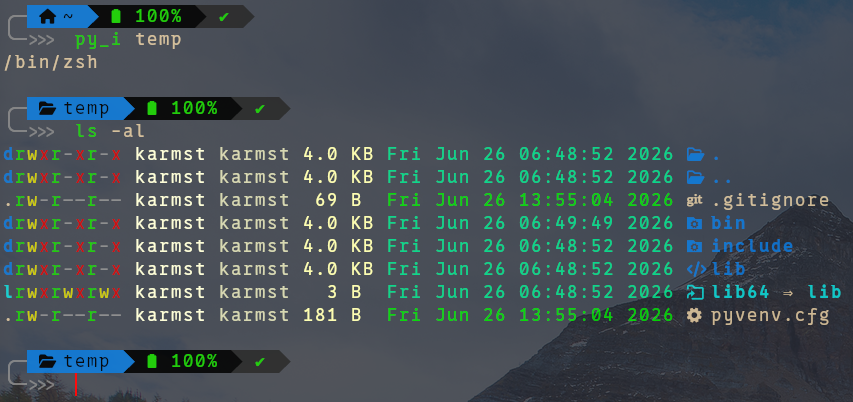
venv directory structure
The screenshot below shows the command that was run, and the resulting test python virtual environment directory struture.
ZSH
The zsh configuration to assist with setting up the Python virtual environment is shown below.
py_i function
function py_i() {
  if [[ "$1" =~ ^.+$ ]] then;
    cd "$HOME/Documents"
    mkdir -p python3/venv
    cd "python3/venv"
    python3 -m venv $1
    cd $1
    echo $SHELL
    source bin/activate
  else
    echo "Directory is required!"
  fi
}
py_d alias
alias py_d="deactivate"