


Introduction
Jitsi Meet provides a viable open source alternative to Microsoft Teams or Zoom, which can be self hosted on your own VPS.
Security
Authentication
From a security perspective, it is a good idea to integrate Jitsi Meet with LDAP for authentication. Even though Jitsi Meet supports internal authentication, this is not recommended.
Pangolin
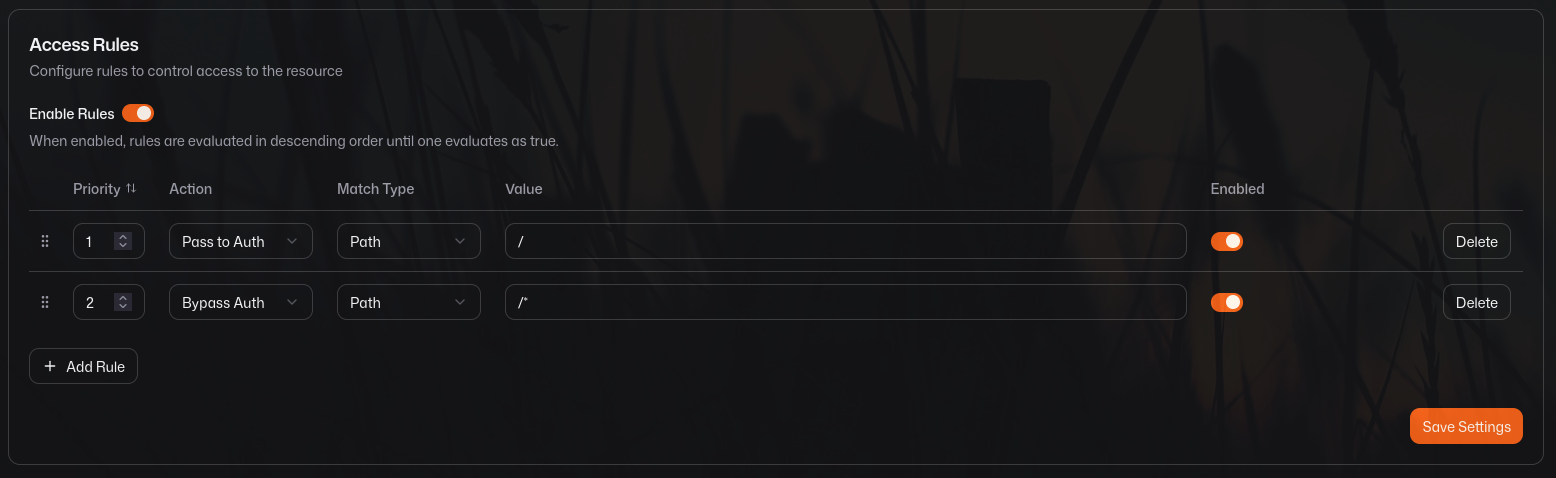
Jitsi Meet should be protected by a system similar to Pangolin. Pangolin redirects users, who are trying to access the root domain, to the configured Pangolin authentication scheme. This is shown in the screenshot below.
nginx
Default routes
The nginx location configuration shown below redirects the User to a default website if the location does not match any of the Jitsi Meet default routes.
  location ~
 "(?=^/(?!pwa).+$)(?=^/(?!xmpp).+$)(?=^/(?!libs).+$)(?=^/(?!sounds).+$)(?=^/(?!images).+$)(?=^/(?!static).+$)(?=^/(?!colibri).+$)(?=^/(?!_next).+$)(?=^/(?!css).+$)"
    {
      return 301 $scheme://jitsi.example.com;
    }
Meeting ID prefix
One could add in a prefix check; in the example shown below, the URI has to start with a value that only the Jitsi Meet administrator knows. We recommend a prefix of at least 12 characters.
location ~ "(?=^/(?!<some_random_string>).+$)"</li>Meeting ID length
One could add in a length check; in the example shown below, the URI has to be at least 32 characters in length.
  location ~ "^/[a-zA-Z0-9]{1,31}$"
    {
      return 301 $scheme://jitsi.example.com;
    }